If, like me, you run a command line Linux distro then seeing useful stats like disk space remaining on your hard drive is a must. To see the current hard drive usage of all mounted partitions simply type the following command into a terminal.
df -hYou should see something similar to the image below.
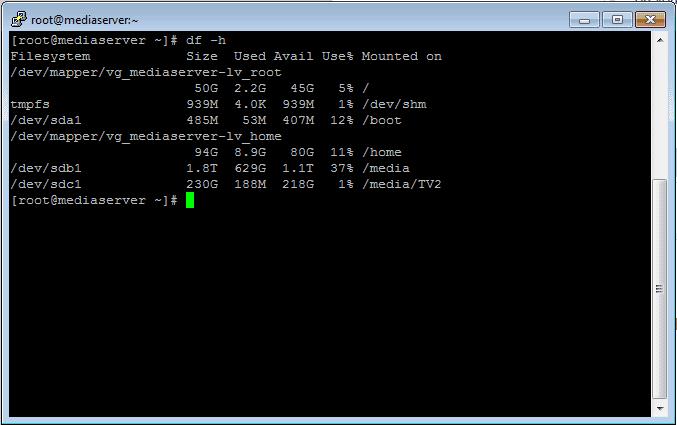
The -h simply puts the drive space into human-readable format eg. 10K, 45G, 1.1T.
There are other options available for the df command but nothing else that needs covering in this post.
If you have other/better ways of getting the same information in Linux command line then please feel free to comment below.

Clive Walkden
Posted:
Latest Articles

Explore the evolution of Magento 2 through its major releases, detailing features added, popularity metrics, and issues encountered.

Author

Linux —
How to Install NordLayer VPN Client on Ubuntu 20.04 and Connect to a Virtual NetworkA simple to follow installation guide for NordLayer VPN
Author

MySQL —
Mastering MySQL Database Imports on LinuxLearn efficient ways to import MySQL databases on Linux using the mysql command-line client. Explore the --source option and < operator for seamless data migration. Master MySQL imports on Linux with our comprehensive guide.
Author